From Mountain Side to Blog Post
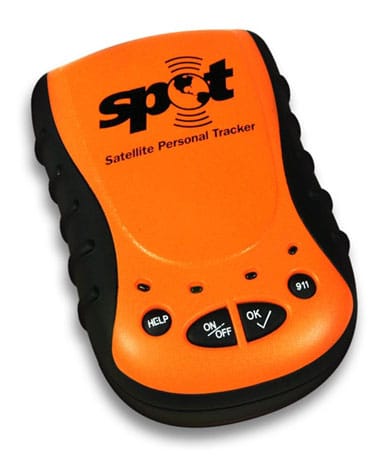
I'm not willing to lug all of the necessary equipment to do blogging from the mountain-side. I'll have a satellite phone with me so I can always just *talk* to people. However, Corey is bringing along his Spot Personal Locator.

A couple hundred dollars gets you that durable little yellow device containing a gps and a transmitter and the annual fee gets you the ability to hit a button and blast an email to your friends notifying them of your position. It's of limited usefulness.
Since I won't be blogging from the mountain, it would be handy if the Spot messages made it to my blog instead. One evening later:
1. we hit the "send" button on the Spot device
2. os x mail receives the message and fires off an applescript
3. the applescript writes the email to disk and fires off a perl script
4. the perl script parses the email and posts a message to blogger
5. profit!
[1. Press the Send Button]
I don't have any pictures to illustrate pushing the Send button, so you'll have to figure this step out on your own.

[2. OS X Mail Does Its Thing]
The kind folks at Spot blast out an email when they receive a signal from our Spot device. The email goes out to everyone important. You're not receiving the email? Interesting....
I did that fancy blurring all by myself.

And we have a Rule set up in Mail to catch these little buggers and hand them off to our AppleScript. An interesting caveat that I ran into: the run-a-script action needs to occur before a move-the-message action. However, if you have both of these actions in the same rule, Mail will automatically order them in the order we don't want. So, you need two rules (if you want to run-a-script and move-the-message).

[3. AppleScript to the Rescue]
For each message that matches our rule we write out the raw data of the email (including the email headers) into a file with a name based on the unique id that Mail assigns to the message. I think Mail just increments some internal counter. We write this email into the directory where our Perl script resides and then we run the script and feed it the file name.

Isn't AppleScript wonderful? How many languages actually let you "code" (it's a bit of a strong word to use when speaking of AppleScript) the same way you might verbalize it?
set theMessage to item a of theSelectedMessages
Compared to, say:
void *theMessage = theSelectedMessages[a];
Anyway....
[4. Perl Does Its Thing]
Google provides a fairly simple and often erroneously documented (I eventually realized) API for accessing Blogger. You can create new blog posts and do lots of things I don't care about. The first step, however, is to log in:

It returns a few values, the only one of which we care about is Auth. We use that in the http header of our create-a-blog-post http post later on.
And that's where things got funky. The documented examples of creating new posts had the content wrapped in a:
<content type='xhtml'>
which I finally realized was causing all of my &-encodings to be displayed quite literally, instead of interpreting them. I finally realized that it was supposed to be:
<content type='html'>
and then, after several minutes of doing lots of annoying conversions of the text I wanted to post, ended up with this (which I later made more readable by making some regex'es do the conversions):

[5. The End Result]
And finally, no more than a second after the email was received, there sits a shiny new blog post with all of the relevant information, and a handy link to Google Maps, which doesn't mean much when the location is in the middle-of-nowhere Alaska, a hundred miles from the closest mapped road. But, whatever.

I'll dump all of the files (AppleScript and Perl) on my site and link to it here, later.